Snap-to-Sell
Photos become a complete listing: title, description, category, condition, suggested price. A vision model looks, you tap publish.
Negotiate without the back-and-forth. And let your AI assistant buy along.
How it works
Selling on nego takes as long as taking the photos. The app does the rest — and negotiates for you if you let it.
Up to eight photos, straight from the camera or your library. That is all you need to know.
Title, description, category, condition and a price range — in seconds, from your pictures. Change whatever you do not like.
Set a floor price, switch Auto-nego on. Offers come in, nego answers within your limits. You only confirm the handover.
Features
Four things classifieds could not do until now.
Photos become a complete listing: title, description, category, condition, suggested price. A vision model looks, you tap publish.
Instead of “or best offer”: buyers make offers, you set a floor. Auto-nego accepts, counters or declines — server-side, within your bounds, even at night.
Claude, ChatGPT, Cursor and friends connect through nego's MCP server. Your assistant searches, reads, bids and messages the seller — after you signed in once in your browser, in your name.
One switch, and your listing also goes to eBay — through nego's central account, no account of your own needed.
Kleinanzeigen has no API. There, a person on the nego team posts your listing by hand, usually within one business day. The app shows you that status honestly.
For AI assistants
nego speaks MCP. Add the address to Claude Desktop, Cursor or any other MCP client — it sends you to the browser once, you sign in and confirm. After that your assistant acts on nego like you would: search, read, bid, respond, message.
{
  "mcpServers": {
    "nego": {
      "url": "https://nego.deals/mcp"
    }
  }
}
No key to copy: sign-in runs through OAuth in your browser. The app lists every connected assistant under Profile → Connect AI assistant, and one tap disconnects it.
search_listingsSearch active listings — keyword, category, max price, condition.get_listingEvery detail of a listing: description, attributes, images, whether offers are open.make_offerPlace a price offer in cents. The full asking price is accepted instantly.my_offersOpen negotiations as buyer or seller — with status and whose move it is.respond_to_offerAccept, decline or counter an open offer.message_sellerSend the seller a chat message, e.g. to arrange the pickup.my_listingsYour own listings with status and pending offers.An assistant only reaches nego once you have signed in and consented in your browser — and you see what it may do while you do it. Every offer an assistant makes is marked as such in the thread.
Read the docsExample listings
The newest listings, straight from the marketplace. Cards with the lime badge accept offers.
 negoExample
Rennrad 56 cm, Stahlrahmen, frisch gewartet
€320
Bornheim, FrankfurtGood
 negoExample
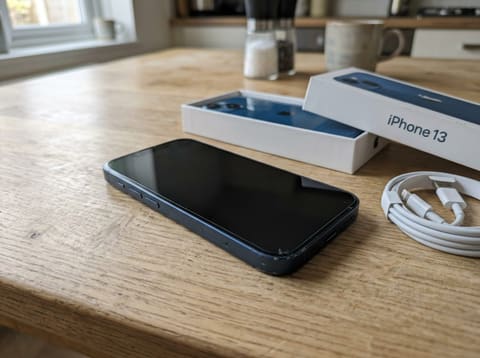
iPhone 13, 128 GB, Mitternacht, mit Karton
€390
Nordend, FrankfurtGood
 negoExample
Vintage Ledersessel, Cognac, Mid-Century
€240
Sachsenhausen, FrankfurtGood
 negoExample
Kinderwagen mit großen Rädern, grau, komplett
€280
Bockenheim, FrankfurtGood
 negoExample
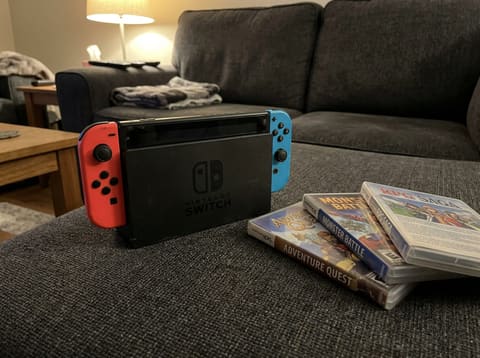
Handheld-Konsole mit Dock und 3 Spielen
€210
Westend, FrankfurtGood
 negoExample
Kaffeevollautomat, entkalkt und gereinigt
€150
Ostend, FrankfurtGood
Questions
nego launches on iPhone first. Sign up and you are in as soon as the app is in the App Store.